Dom-Exercises

DOM Exercises#

Note: you can copy the codes to any editor to work on it. CodePen for example.

Exercises 01#


Modify the style of the paragraph text in the following HTML File through javascript code. By Clicking on the button the font, font size, background color and text color of the paragraph text will be changed.

Sample HTML file

<!DOCTYPE html>
<html>
<head>
<meta charset="utf-8" />
<title>JS DOM paragraph style</title>
</head>
<body>
<p id ='text'>JavaScript Exercises - women crash course</p>
<div>
<button id="changeStyle" onclick="changeStyle()">Style</button>
</div>
</body>
</html>

Exercises 02#


Write a JavaScript function to get the value of the href, hreflang, rel, target, and type attributes of the specified link.

Sample HTML file

<!DOCTYPE html>
<html>
<head>
<meta charset="utf-8" />
</head>
<body>
<p>
<a id="wcc" type="text/html" hreflang="en-us" rel="nofollow" target="_self" href="https://github.com/gazaskygeeks/women-crash-course">WCC</a>
</p>
<button onclick="getAttributes()">
Click here to get attributes value
</button>
</body>
</html>

Exercises 03#

Write a JavaScript program to calculate the volume of a sphere.
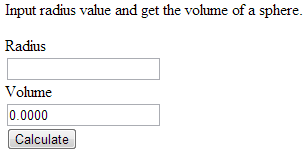
volume-sphere-html-form

Note : sphere_volume = (4/3) Math.PI Math.pow(radius, 3); (V = 4/3 πr³)

Sample HTML file

<!DOCTYPE html>
<html lang="en">
<head>
<meta charset="utf-8" />
<title>Volume of a Sphere</title>
<style>
body {
padding-top: 30px;
}
label,
input {
display: block;
}
</style>
</head>
<body>
<p>Input radius value and get the volume of a sphere.</p>
<form method="post" id="MyForm">
<label for="radius">Radius</label>
<input type="text" name="radius" id="radius" required />
<label for="volume">Volume</label>
<input type="text" name="volume" id="volume" />
<input type="submit" value="Calculate" id="submit" />
</form>
</body>
</html>